
How to Install the i‑thriv Mobile Massage App on iPhone and Android
Wellness is now easier to reserve. Install the i‑thriv app for convenient access to professional mobile massage and wellness services throughout Southern California.
Book from your phone and enjoy spa-quality wellness at your home, hotel, vacation rental, office or special event.
Why Install the i‑thriv App?
With the i‑thriv app, you can:
- Reserve mobile wellness services directly from your phone
- Explore massage services, spa parties and wellness enhancements
- Manage your upcoming appointments
- Rebook your preferred services faster
- Access important appointment information
- Receive updates, rewards and special offers
- Claim a $25 Wellness Credit when you create a new client account
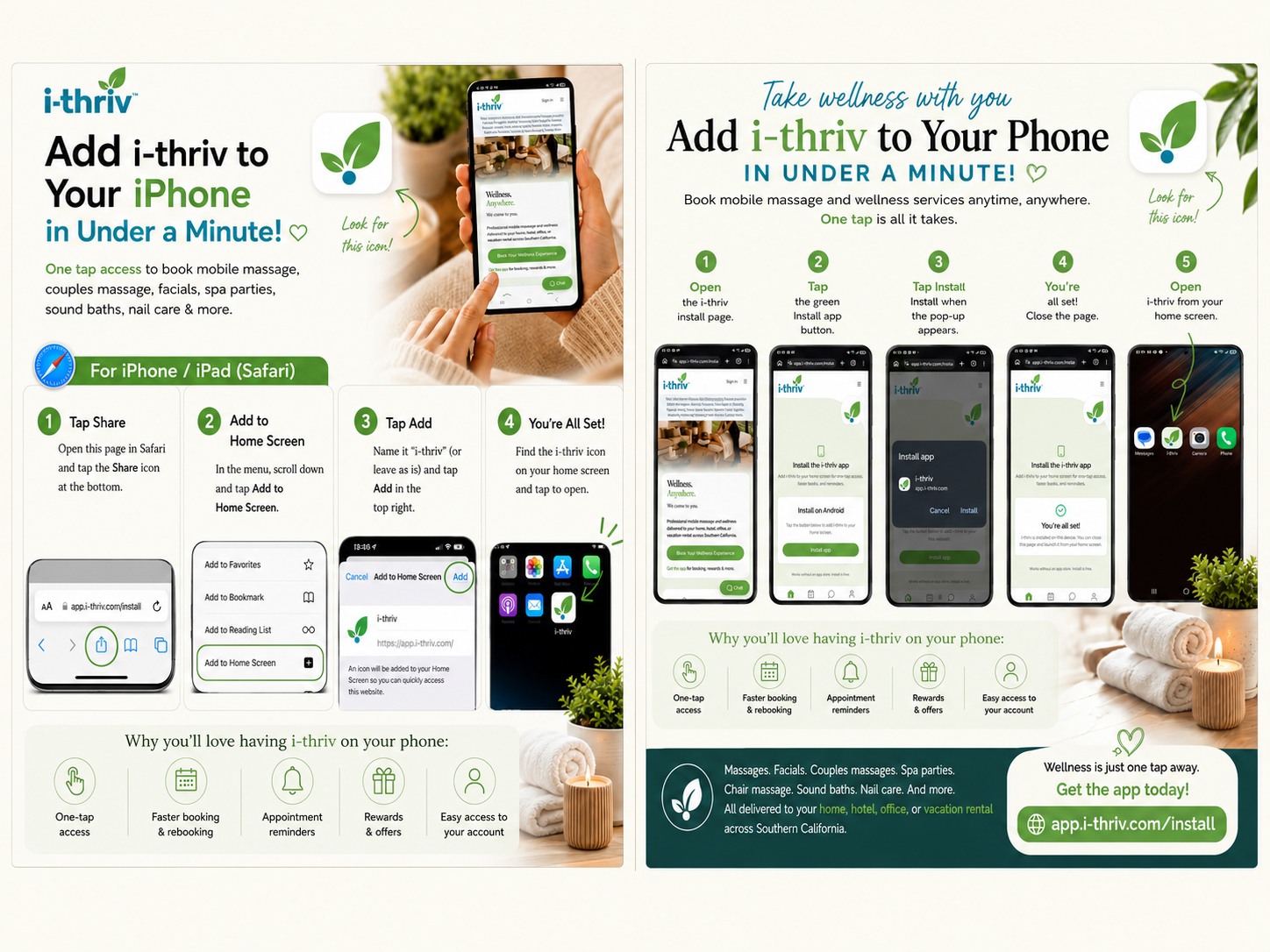
How to Install i‑thriv on an iPhone or iPad
For the best results, open the installation page directly in Safari.
- Open app.i‑thriv.com/install in Safari.
- Tap the Share icon at the bottom of the screen.
- Scroll down and select Add to Home Screen.
- Confirm the name “i‑thriv.”
- Tap Add in the upper-right corner.
- Find the i‑thriv icon on your Home Screen.
- Open the app and create or sign in to your account.
How to Install i‑thriv on an Android Device
For the best results, open the installation page directly in Google Chrome.
- Open app.i‑thriv.com/install in Chrome.
- Tap the green Install app button.
- Select Install when the confirmation window appears.
- Close the installation page after the app is installed.
- Find the i‑thriv icon on your Home Screen.
- Open the app and create or sign in to your account.
How to Claim Your $25 Wellness Credit
After installing the app, create your new i‑thriv client account and complete your profile. Your $25 Wellness Credit can be applied toward an eligible future wellness service.
The credit is available to new clients and is subject to current promotional terms, service availability and booking minimums.
What Services Can You Reserve?
Use the i‑thriv app to explore and reserve:
- Solo mobile massage
- Couples massage
- Prenatal massage
- Spa parties
- Bachelorette spa parties
- Corporate chair massage
- Employee wellness experiences
- Mobile facials
- Mobile nail care
- Assisted stretching
- Cupping and other available enhancements
- Services for eligible Self-Determination Program participants
Services and provider availability may vary by location.
Where Does i‑thriv Provide Mobile Wellness Services?
i‑thriv brings professional mobile wellness services to homes, hotels, vacation rentals, offices and events throughout:
- Temecula and Temecula Wine Country
- Murrieta and Menifee
- Riverside and the Inland Empire
- Irvine and Orange County
- Palm Springs and the Desert Cities
- San Diego and North San Diego County
- Moreno Valley and surrounding communities
Visit our service areas to check availability near you.
Important Installation Tip
If you open the installation page through Instagram, Facebook, Gmail or another in-app browser, the installation option may not appear.
Copy the installation link and open it directly in Safari on an iPhone or iPad or Chrome on an Android device.
You can also learn more about browser-based app installation through this PWA installation guide.
Take Wellness With You
Enjoy faster access to mobile massage, spa parties, corporate wellness and other services—all from your phone.
Once the i‑thriv app is approved for the Apple App Store and Google Play Store, the official download links will be added to this guide.
Frequently Asked Questions
Do I need the app to book an appointment?
No. You can book at i‑thriv.com/book in any browser. The app simply makes booking, rebooking and appointment updates faster.
Is the i‑thriv app available in the App Store and Google Play?
The app installs directly from app.i‑thriv.com/install as a home-screen app. Once store approval is complete, the official download links will be added to this guide.
Does the app work on both iPhone and Android?
Yes. Installation steps are provided above for iPhone and iPad (Safari) and for Android (Chrome).
How do I know a provider is available at my address?
Enter your address or ZIP code on the booking page, or browse the service-area directory to see where providers currently travel.
Areas We Serve
- Temecula Wine Country
- Inland Empire
- Riverside
- Corona
- Moreno Valley
- Orange County
- Irvine
- Redlands
- Palm Springs & Desert Cities
Availability varies by location, group size, and provider availability.
Ready to book?
Professional wellness, delivered to you. Wellness, Anywhere.™